Overview
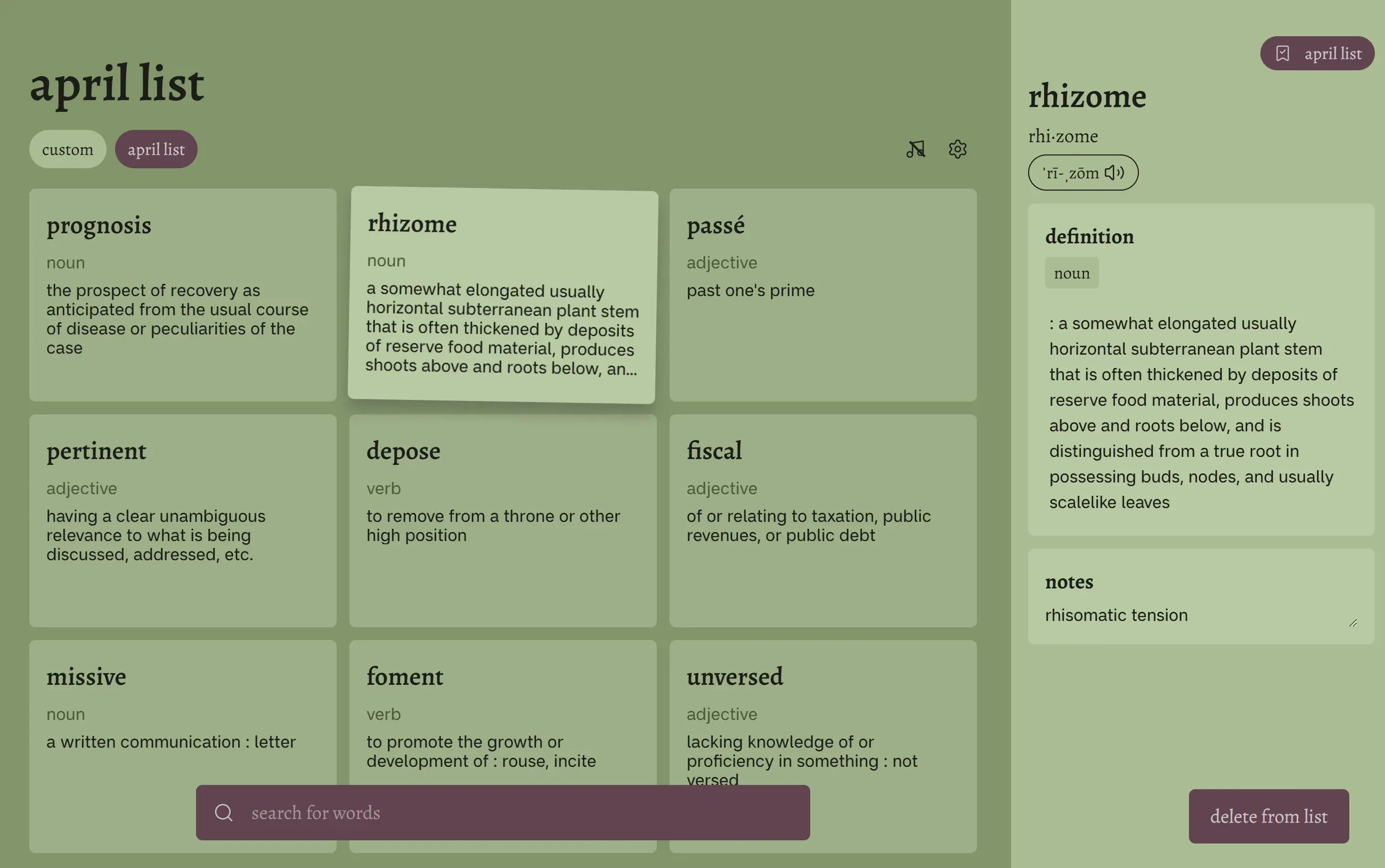
Vocab Forest is a web app that allows users to search and save vocabulary cards into lists. Built using React and Supabase as its main technologies, and deployed to the internet using Cloudflare. This was a personal project that I worked on with a friend with the goal of learning more about full stack development.
Role
Full Stack Developer
UI/UX Designer
Timeline
March – April 2026
5 weeks
Architecture
My friend wrote a really good case study focusing on the design process and development process (click here to check it out), therefore I will focus on the architecture of the site.
Architecture Overview
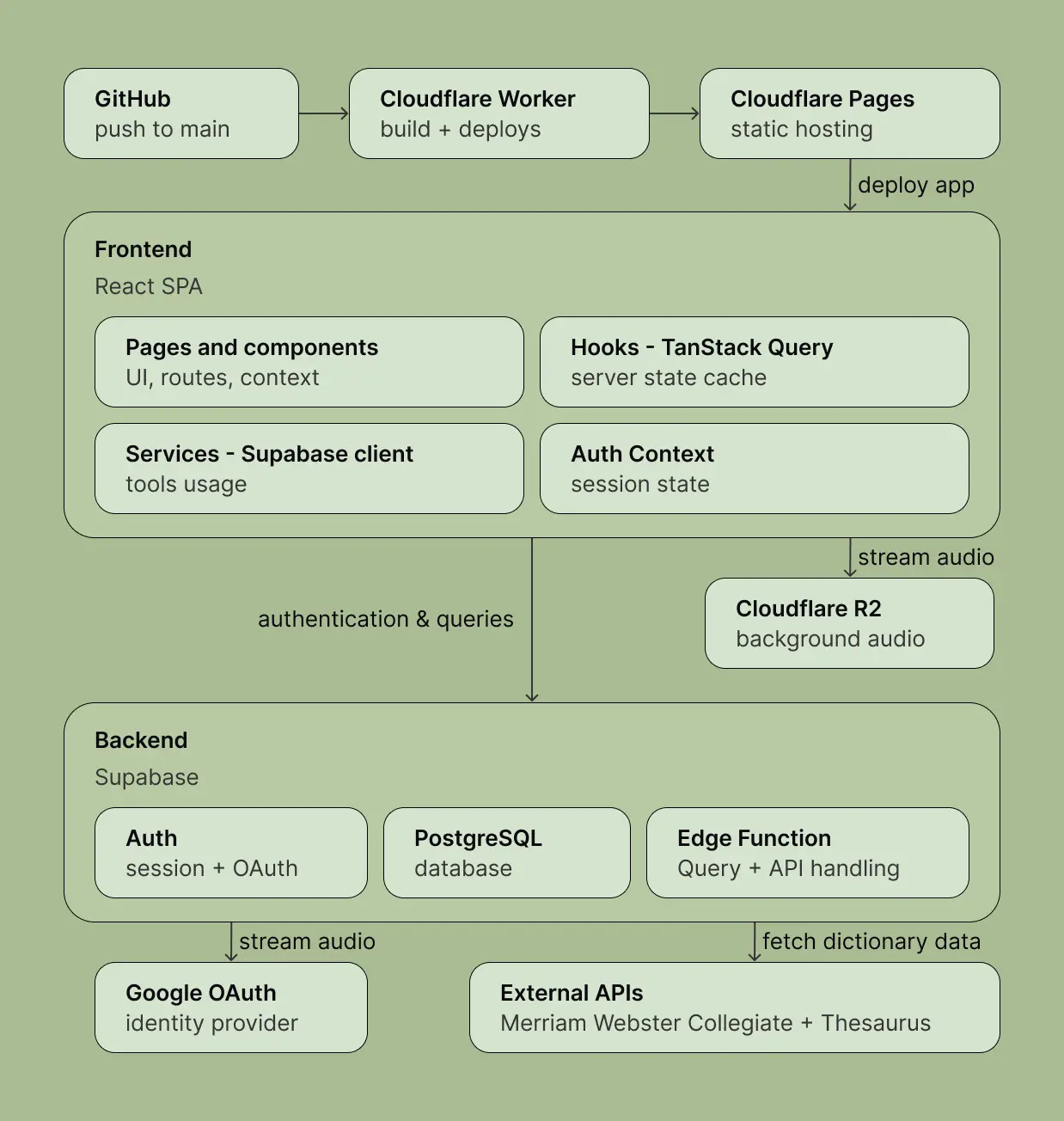
Here is the overview of the whole architecture. And I will dive into them step-by-step, starting from the backend, the frontend, and finally the deployment.
Tech Stack
Backend (Supabase)
Supabase serves as the backbone for authentication, the database, and server-side logic.
Auth
Users can sign in via three methods:
- Google OAuth: redirect-based flow handled entirely by Supabase Auth
- Email / password: traditional credential-based login
- Anonymous (demo): instant ephemeral session with no sign-up friction
The AuthContext listens to supabase.auth.onAuthStateChange() and reactively updates the user state across the app.
Anonymous users can later link their account to Google or email through the settings modal, preserving their data.
Postgres Database
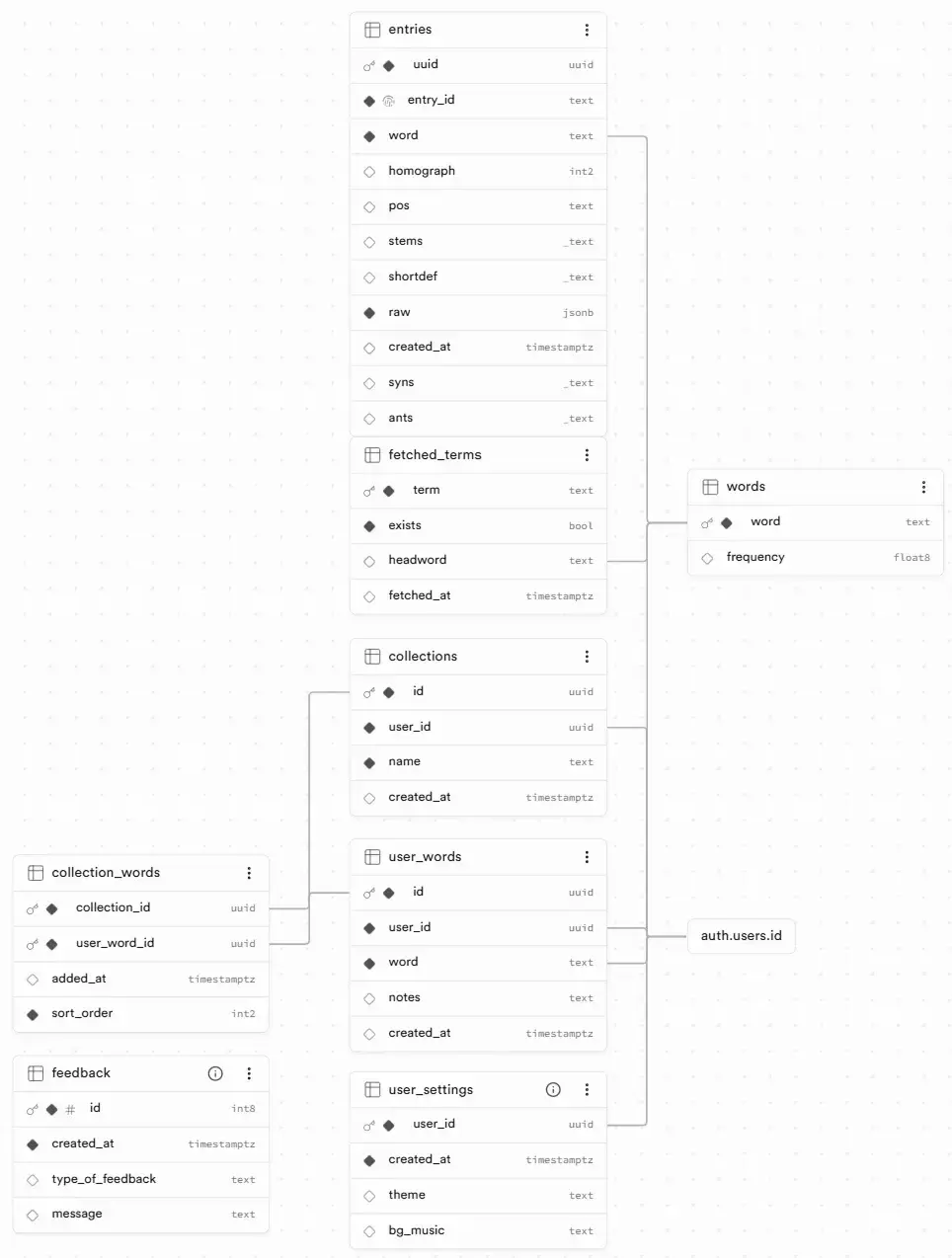
The schema consists of 8 tables and 1 view:
| Table | Purpose |
|---|---|
words | Canonical word list (used for autocomplete suggestions) |
entries | Full Merriam-Webster entries with raw JSON, definitions, synonyms, antonyms |
user_words | Join between a user and a saved word |
collections | Named lists created by the user |
collection_words | Many-to-many join with sort_order for drag-and-drop reordering |
fetched_terms | Cache of previously looked-up words to avoid redundant API calls |
user_settings | Theme and background music preferences |
feedback | User-submitted feedback messages |
The user_words_full view aggregates user_words with their associated entries and collections as JSON arrays,
letting the frontend fetch everything for the home page in a single query avoiding the N+1 problem. The reset_account RPC function clears a user’s words and collections on demand.
user_words_full viewEdge Function (Deno)
The add-word-user-collection edge function runs on Supabase’s Deno runtime and handles the heavy lifting of looking up a word and saving it to a collection. It’s only invoked when the service layer (client-side) finds a cache miss in fetched_terms. Inside the function:
- Parallel API calls: fires requests to both Merriam-Webster Collegiate and Thesaurus APIs simultaneously
- Enrichment: thesaurus entries are matched to collegiate entries by shared UUID, then merged (synonyms and antonyms are deduplicated)
- Database upsert: words, entries, and
fetched_termsare upserted; the word is added to the user’s collection - Response: returns the canonical headword and its entries
The function also handles edge cases: non-existent words return spelling suggestions, compound words and phrases are filtered out via isBaseEntry(), and homographs are carefully preserved.
External APIs
Merriam-Webster
Two MW APIs are consumed in parallel from the edge function:
- Collegiate Dictionary API: full entries with definitions, pronunciations, functional labels, and usage notes
- Thesaurus API: synonyms and antonyms organized by sense, matched to collegiate entries by
target.uuid
The merge gives each definition block its own set of synonyms and antonyms. Much more useful than a flat list.
Google OAuth
Handled by Supabase Auth. The frontend calls supabase.auth.signInWithOAuth({ provider: "google" }), and Supabase manages the redirect flow, token exchange, and session creation.
Frontend
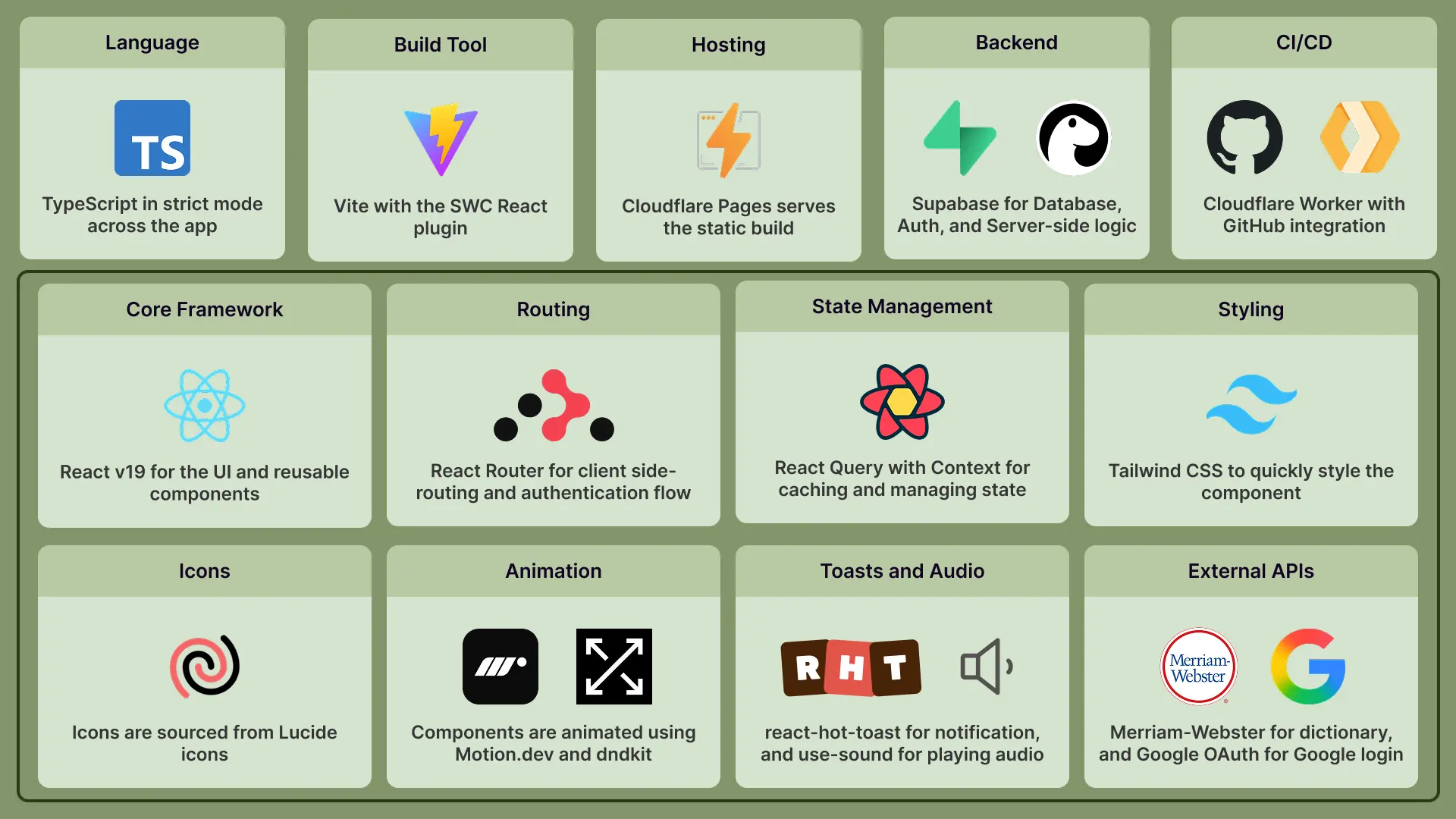
React 19 + TypeScript
The UI is built with React 19 and TypeScript in strict mode. Vite with the SWC plugin handles bundling and hot module replacement.
State Management
TanStack Query is the data-fetching backbone. Key decisions:
staleTime: Infinity: no automatic refetching. Data stays fresh until explicitly invalidated by a mutation, keeping the UI predictable- Optimistic updates on every mutation: the cache is updated before the server confirms, giving instant feedback. On error, the cache rolls back
- Targeted
setQueryData(): mutations update the cache surgically instead of broadinvalidateQueries()calls
React Context handles transient UI state: selected word, active collection, sort mode, theme, and auth.
UI Components
| Technology | Usage |
|---|---|
| Tailwind CSS | Utility-first styling across all components |
| Motion.dev | Animated sidebar overlay on word selection |
| dndkit | Drag-and-drop card reordering in custom sort mode |
| react-hot-toast | Toast notifications for actions and errors |
| use-sound | Background rain audio playback |
| Lucide | Icon library |
Routing
React Router v6 with a data router handles navigation. Two guard components enforce access:
ProtectedRoutesredirects unauthenticated users to the landing pageAuthRoutesredirects authenticated users to/home
Deployment & CI/CD
The app is deployed entirely through Cloudflare:
- Cloudflare Pages: serves the static Vite build
- Cloudflare Workers: runs the CI/CD pipeline. A push to
mainon GitHub triggers an automatic rebuild and redeploy - Cloudflare R2: stores and streams background rain audio
- Domain:
vocabforest.comis registered through Cloudflare
No manual deployment steps. Every commit to main ships to production within minutes.
Autocomplete
The autocomplete dropdown is designed to feel snappy and helpful while keeping database calls minimal.
Word List
The initial word list came from Moby Word II, common dictionary (Project Gutenberg) containing 74,550 words.
I wrote a Python script using the wordfreq library to assign a frequency score to every word, with a heuristic: single words get a 10x boost, multi-word phrases get a 0.1x penalty.
This pushed natural English words to the top of autocomplete results while burying obscure dictionary artifacts.
A Deno script then imported the enriched list into the words table in batches of 1000.
Self-Correcting via Edge Function
The edge function doubles as a curation feedback loop. When a user searches a word:
- If MW doesn’t know it: the word is deleted from the
wordstable, so it stops appearing in autocomplete for everyone - If MW knows it: the word is upserted into the
wordstable, so it becomes available for future autocomplete queries even if it wasn’t in the original Moby list
Over time, the dictionary self-corrects toward MW-validated English without manual maintenance.
Frontend UX
The SearchBar uses a 250ms debounce (via @uidotdev/usehooks) so the .ilike() query only fires after the user stops typing. The query is constrained to a 3-character minimum and a 5-result limit, ordered by frequency DESC so common words appear first. A 5-minute staleTime on the TanStack Query cache means retyping a recent prefix hits memory, not the database. A small UX detail: the dropdown closes on blur with a 100ms delay so the onMouseDown event on a suggestion fires before the list disappears.
Key Flow: Adding a Word
The most interesting data flow is adding a word to a collection:
- User types a word in the SearchBar. After 3 characters, autocomplete kicks in;
useWordSuggestionsqueries thewordstable via.ilike()with debounced input (250ms) - On submit,
useAddWordToCollectionmutation fires - Optimistic update: a placeholder
UserWordis inserted into the query cache withuser_word_id: "optimistic-${Date.now()}". The UI immediately shows a dimmed card - Cache check: the service layer queries
fetched_terms:- Hit + exists → directly insert into
user_words+collection_words - Miss → invoke the edge function
- Hit + exists → directly insert into
- Edge function calls Merriam-Webster Collegiate and Thesaurus APIs in parallel, enriches entries, upserts into the DB, and returns the canonical headword
- On success:
fetchUserWord()retrieves the fresh full entry fromuser_words_full - Cache swap: the optimistic placeholder is replaced with the real
UserWordobject. The card now displays definitions, synonyms, and audio
If the word already exists in a collection, only the collection membership is updated. If the word doesn’t exist in MW, spelling suggestions are returned to the user.
Key Learnings & Challenges
The fetched_terms Cache Pattern
A naive approach would call the Merriam-Webster API every time a word is added.
The fetched_terms table acts as a memoization layer. Once a word has been looked up, subsequent adds bypass the 1–2 second API call entirely, cutting latency from ~2s to instant. The trade-off is cache staleness: if MW updates their data, cached entries stay stale until a manual reset.
Edge Function Complexity
The add-word-user-collection function juggles authentication verification, parallel API requests, UUID-based data enrichment,
database transactions, and headword resolution. The trickiest part was the UUID merge. A single thesaurus entry can target multiple collegiate homographs, and some collegiate entries have no thesaurus match at all. The enrichCollegiateWithThesaurus() function handles this with a two-step map-and-merge approach.
Optimistic Update Friction
Optimistic updates work beautifully when you know the final shape of the data. But the edge function can change the word. For example, “runing” might resolve to “running” as the canonical headword. The optimistic placeholder uses the user’s input, but the real data uses the canonical word. The cache replacement logic has to find the placeholder by its optimistic-* ID and swap it out correctly, handling the case where the placeholder key doesn’t match the returned key.
TanStack Query with staleTime: Infinity
Setting staleTime: Infinity was intentional. Dictionary data doesn’t change mid-session, and auto-refetching would cause jarring UI shifts as cards re-render. The downside is discipline: every mutation must explicitly update the cache. We handle this with targeted setQueryData() calls in every mutation’s onSuccess, keeping the cache consistent without broad invalidations.
Merriam-Webster’s Inconsistencies
MW’s API is powerful but irregular. Compound words and phrases (e.g., “bank card”) had to be filtered out using the isBaseEntry() helper. Homographs (same word, different etymologies e.g. “bank:1” vs “bank:2”) needed careful handling. We keep all homographs but prefer exact headword matches. And MW’s proprietary inline markup ({it}, {sc}, {dx}) required a 685-line custom parser (MWEntriesParser.ts) to convert into clean HTML.